The best Klaviyo flows for an ecommerce store are the ones that reach a shopper at a moment of intent. Those are a welcome series for new subscribers, an abandoned cart flow for checkout dropouts, a browse abandonment flow for window shoppers, and a post-purchase flow for new customers. If your list is young, start with welcome and cart. If you have repeat buyers, add review, cross-sell, and replenishment flows. If your list is a few years old, winback, VIP, and sunset flows pull the most value out of it.
Most store owners hit the same wall. Klaviyo's flow library offers dozens of templates, and the help docs explain every button, but neither tells you which flows pay back first or what each email should say. The result is an account with the default flows half-edited, or twenty flows that nobody has tested.
This guide covers what flows are and how they work, ten flows in the order we would build them, and the step-by-step setup in Klaviyo's current flow builder. We build and tune these flows for ecommerce brands at Chromex, so the timing, content, and mistakes below come from live accounts.
What Klaviyo flows are and how they work
A Klaviyo flow is an automated sequence of messages and actions that starts when a customer does something, or when a date arrives, and then runs without you touching it. Flows can send email, SMS, and push notifications. They can also update profiles, add people to lists, and alert your team. Once a flow is live, it handles every qualifying customer on its own.
Flows versus campaigns
Flows and campaigns do different jobs, and a healthy account needs both. A campaign is a one-time send that you schedule to a list or segment. A flow reacts to behavior and keeps running.
Flow | Campaign | |
|---|---|---|
Starts when | A customer triggers it, or a date arrives | You schedule it |
Audience | Each person enters at their own moment | Everyone in the segment at once |
Upkeep | Build once, review on a schedule | Write and send every time |
Best for | Welcome, recovery, post-purchase, retention | Sales, launches, newsletters |
Trying to run a store on campaigns alone means someone has to remember to send every cart reminder by hand. That does not scale past a handful of orders a day.
The five parts of every flow
Every flow in Klaviyo is built from the same five parts. Learn them once and every template makes sense.
Trigger: the event that starts the flow. Options are a list, a segment, a metric such as Placed Order, a date property such as a birthday, a price drop, or low inventory.
Filters: trigger filters and profile filters decide who gets in and who stays eligible.
Actions: message actions send email or SMS. Data actions update profiles or lists, or fire alerts and webhooks. Logic actions add delays and conditional splits.
Time delays: a wait of minutes, hours, or days between steps.
Status: every action is draft, manual, or live.
A flow is a trigger, a few filters, and a series of timed messages, and nothing more mysterious than that.
Why flows earn more than campaigns
Flows earn more per send because they reach people when intent is highest. A shopper who left a cart an hour ago is far more likely to buy than a random subscriber getting a Tuesday newsletter. In the accounts we manage, flows produce a share of email revenue far out of proportion to the number of emails they send.
Flows do have a dependency. Klaviyo can only trigger on events it receives, so a connected store integration with working tracking is a prerequisite. Klaviyo's pricing also scales with your contact count, so a flow that sunsets dead profiles saves real money.
1. Welcome series flow
The welcome series is the first flow every store should build, because it greets people at the moment they raise their hand. It turns a new subscriber into a first-time customer with a short run of emails after signup. It is also the flow most Klaviyo flows for ecommerce setups lean on hardest.
How it works
A welcome flow triggers when someone joins a list, usually through a sign-up form. Klaviyo recommends keeping email and SMS welcome flows separate, since people opt in to each channel separately and a welcome flow can only be entered once.
Trigger: added to your newsletter list
Timing: first email immediately, then one to four days between emails
Length: three to five emails
Filter: has not placed an order since starting the flow
Useful split: new subscriber versus existing customer
What to send
Each email needs one job. Spread the jobs across the series instead of cramming them into email one.
Email 1: deliver the incentive or a clear thank you, and set expectations
Email 2: tell the brand story and why you make what you make
Email 3: show best sellers with reviews and social proof
Email 4: remind them that the offer ends soon
Welcome emails go to people at their warmest, so spend your best copy and design here before anywhere else.
Best fit and common mistake
Every store needs this flow, with no exceptions. The most common mistake is sending a first-purchase discount to people who already bought. The filter and split above prevent it.
Leave time between emails as well. Klaviyo's own guidance gives at least 24 hours between welcome emails as an example, and we rarely go shorter.
2. Abandoned cart flow
The abandoned cart flow recovers shoppers who started checkout and left, and it is usually the highest-earning flow in an account. It is the single flow we would build first if we could build only one. Of all the best Klaviyo email flows, this one has the clearest payback.
How it works
The flow triggers on the Started Checkout metric. People leave carts for ordinary reasons, so a quick, plain reminder works better than pressure.
Trigger: Started Checkout
Timing: first email one to four hours later, second email about a day after that, optional third
Filter: has placed order zero times since starting this flow
Useful split: cart value, or new versus returning customer
What to send
Show the exact items with images and a button that returns to the cart. Then answer the objections that usually stop a purchase: shipping cost, delivery time, returns, and payment options. Add a review or two for the product that was left behind.
Keep the discount for the last email only. Offering money in the first reminder teaches shoppers to abandon carts on purpose. A short SMS as the final nudge can also carry time-sensitive steps better than a third email.
Send the plain reminder first and the incentive last, because the discount you did not need to give is pure margin.
Best fit and common mistake
Any store with a checkout needs this flow. The common mistake is skipping the profile filter. Without it, a customer who buys after the first email still gets the second and third, which looks careless and costs you trust.
3. Browse abandonment flow
Browse abandonment emails reach people who viewed a product but never added it to a cart. The signal is weaker than a cart, so this flow should be shorter, softer, and slower to pressure. Browse abandonment is among the most useful Klaviyo flows ideas for stores with real traffic.
How it works
The flow triggers on the Viewed Product metric. It only works for visitors Klaviyo can identify, such as subscribers who clicked an email or signed up earlier.
Trigger: Viewed Product (requires onsite tracking)
Timing: two to four hours after the view
Length: one or two emails
Filter: has not started checkout since starting this flow
Useful split: product category
What to send
Show the product they viewed and a few similar items. Add reviews and customer photos, since a browsing shopper is still deciding. Leave discounts out. They cut margin, and a code attached to a casual product view tends to get shared online.
Scarcity works here only when it is true. If your best sellers do sell out, say so plainly. If they do not, a simple "still thinking about this?" email performs just as well.
Best fit and common mistake
This flow suits stores with consideration purchases, larger catalogs, and steady traffic. The mistake we see most is overlap with the cart flow. Exclude anyone who has started checkout, or a single shopper can get both emails within an hour.
4. Post-purchase thank-you flow
A post-purchase flow welcomes a new buyer, sets expectations, and starts building loyalty. It builds the relationship while the product is in transit and the customer is most attentive. It is the flow that makes the second order more likely.
How it works
It triggers on the Placed Order metric and splits first-time buyers from repeat buyers. Your store platform still sends the receipt and shipping confirmations. This flow is a separate layer of marketing messages on top.
Trigger: Placed Order
Timing: immediately, then about three days, then about a week
Length: two or three emails
Useful split: first order versus repeat customer
What to send
For first-time buyers, thank them, tell the brand story, show how to get the most from the product, and give a support contact. For repeat buyers, acknowledge the history instead of repeating the first-order script. A returning customer who gets the same welcome as a stranger notices.
Wait to pitch anything new until the product has arrived. An optional limited-time "bounce-back" offer later in the sequence can encourage a second purchase.
Best fit and common mistake
Every store should run this flow. The mistake is a hard cross-sell before delivery. It reads as pushy and delays the trust you are trying to build. Our rule is thank first, teach second, sell third.
A post-purchase email that pitches another order before the first one arrives wastes the customer's best attention.
5. Product review flow
A review flow asks buyers for a review after they have had time to use the product. The reviews you collect become social proof that lifts every other flow. It is a small flow with an outsized effect on conversion.
How it works
It triggers on the Placed Order or Fulfilled Order metric, followed by a delay. Klaviyo does not support embedded reviews inside an email, so the email links to your review app. Apps such as Yotpo and Okendo integrate with Klaviyo.
Trigger: order placed or fulfilled, then a delay
Timing: about 5 to 10 days after delivery, adjusted by product
Length: one or two emails
Filter: has not left a review
What to send
Keep it to one clear ask. If a customer bought three products, list all three with a button for each, so they do not have to hunt for links. Thank them for their time, and make the review form as short as your app allows.
Best fit and common mistake
This flow suits stores whose product pages need proof, which is most of them. Timing is where it goes wrong. A skincare serum needs weeks of use before anyone has an opinion, while a phone case needs days. Calibrate the delay per product line, and think about when your carrier actually delivers rather than when the order was placed.
6. Cross-sell and replenishment flow
This flow brings past buyers back for a related item or a refill. Cross-sell suggests complementary products a few weeks after an order. Replenishment reminds buyers just before a consumable runs out. Both fit into the same flow structure and both raise customer lifetime value.
How it works
Both versions trigger on Placed Order and rely on a delay that matches how the product is used.
Cross-sell timing: about 14 to 30 days after purchase
Replenishment timing: just before the product runs out, such as day 25 for a 30-day supply
Length: one to three emails
Filter: has not placed an order since starting this flow
Useful split: product or category purchased
What to send
For cross-sell, recommend genuinely complementary items based on what the customer bought, not your best sellers across the board. For replenishment, make the reorder as close to one click as you can, with a button that leads to a pre-filled cart. If you offer subscriptions, mention them.
The best cross-sell email is the one where the product obviously belongs with what the customer already owns.
Best fit and common mistake
Larger catalogs and consumables, such as coffee, supplements, skincare, and razors, benefit most. Small catalogs get modest results because there is little to recommend. That is fine, since a low-conversion flow that costs nothing to run is still worth having. The common mistake is timing replenishment off the order date and ignoring how fast people actually use the product. Use your own repurchase data.
7. Back-in-stock flow
A back-in-stock flow tells shoppers the moment a sold-out item returns. These are some of the highest-intent emails you can send, because the customer already asked for the product. They are also among the lowest-effort flows to maintain.
How it works
A shopper clicks a notify-me button on an out-of-stock product and gives their email or phone number. When the item is restocked, the flow fires. Setting up the back-in-stock feature and notify-me form comes first, and your store integration needs to support it.
Trigger: back-in-stock request, fired on restock
Timing: immediately on restock
Length: one email, with an optional follow-up
Filter: has not purchased the item
What to send
Keep the email simple: the product image, the name, a restock headline, and one button. If stock is limited, say how limited. Alongside the alert you can show related products as a quiet cross-sell.
A follow-up a day or two later works only if the item is still in stock and the customer has not bought. A related option is the low inventory trigger, which lets you warn people who viewed or checked out an item when it reaches a threshold you set.
Best fit and common mistake
Stores that sell out of items, run limited drops, or hold seasonal stock get the most from this flow. The mistake is sending the alert after the item has sold out again. Keep restock alerts tied to real inventory and send them quickly.
8. Winback flow
The winback flow brings back customers who bought before but have gone quiet. It is a retention flow, so it matters more as your customer file grows. Done well, it turns lapsed buyers into second-order buyers at no acquisition cost.
How it works
It triggers on a segment of customers whose last order is older than your normal repurchase window. A common starting point is 60 to 90 days. Your own data should set it.
Trigger: segment of customers with no recent order
Timing: based on your buying cycle
Length: two or three emails
Filter: has placed an order zero times since starting this flow
Useful split: product purchased, or order count
To find your window, look at the time between first and second orders. Pick the point after which most repeat buyers have already returned. A coffee subscription and a furniture store have nothing in common here.
What to send
Open with something low-pressure, such as what is new since they last shopped. If that does not bring them back, the next email carries a real offer. For accounts where winback matters a lot, a short survey asking what went wrong can follow.
Set the winback window from your own repurchase data, because a generic 90 days is wrong for most brands.
Best fit and common mistake
This flow suits any brand with repeat purchases. The main mistake is discounting everyone, including people who were about to buy anyway. Lead with value first and save the offer for the second or third message.
9. VIP flow
The VIP flow recognizes your best customers so they do not get the same emails as someone on a first order. It tells loyal buyers that their history registered somewhere. It also gives you a segment to protect from heavy discounting.
How it works
It triggers when someone enters a VIP segment, which you define by lifetime spend or order count. Klaviyo's segment trigger handles this well because the segment updates as people cross the threshold.
Trigger: entered VIP segment
Timing: immediately on entry
Length: one or two emails
Useful split: spend tier
What to send
Explain what VIP status gets them, then give one primary button. Perks should be real: early access to new products, a standing perk, free shipping, or an invitation to a private group. Sending the email from a founder's name, rather than the brand, makes it feel personal.
Best fit and common mistake
Brands with repeat buyers and a solid average order value benefit most. The common mistake is a VIP label with no actual perk. If the status changes nothing for the customer, it is just another promotional email. Pair the flow with a VIP exclusion on your deepest sale campaigns.
10. Sunset flow
The sunset flow is the housekeeping flow. It gives unengaged subscribers one last chance to stay, then moves them out of your active list. It protects deliverability, which affects every other flow on this list.
How it works
It triggers on a segment of subscribers who have not engaged for an extended period, often 90 to 120 days. Define engagement by clicks and site activity as well as opens. Apple Mail Privacy Protection inflates open data, so opens alone can mislead you.
Trigger: segment of unengaged subscribers
Timing: first email right away, then about a week and two weeks later
Length: two or three emails
Filter: no recent engagement
What to send
Ask directly whether they still want to hear from you, and make staying subscribed a one-click choice. Offer a preference option so people can ask for fewer emails instead of none. A final offer can win some back. Then stop sending to anyone who does not respond.
Best fit and common mistake
Any list older than a year needs this flow, and larger lists need it most. Unengaged contacts drag down inbox placement for the rest of your list, and your Klaviyo bill grows with contact count. The mistake is running the sunset flow once and never again. Review it every quarter.
An unengaged subscriber costs you deliverability and money, and the only way to find out whether they are worth keeping is to ask once, clearly.
Which Klaviyo flows to build first and when to send them
Build in order of intent: welcome, abandoned cart, and post-purchase first, then browse abandonment, review, and back-in-stock, then the retention flows. That sequence matches how fast each flow pays back. Klaviyo's own guidance points to the same core: welcome, abandoned cart, post-purchase, and winback.
A build order that works
Use this order for a store starting from little automation.
Weeks 1 and 2: welcome series, abandoned cart, and post-purchase. These capture your highest-intent moments.
Weeks 3 and 4: browse abandonment, product review, and back-in-stock. These add recovery and proof.
After that: cross-sell and replenishment, winback, VIP, and sunset. These need order history and a mature list.
Launching everything in one sprint rarely goes well. Reading the results afterward, and knowing which email in a six-message sequence is the weak link, takes longer to learn than the build itself.
Starting timing for each flow
Use the table below as a starting point. Every brand's buying cycle differs, so test the delays against your own data.
Flow | Trigger | First message | Typical length |
|---|---|---|---|
Welcome series | Added to list | Immediately | 3 to 5 emails |
Abandoned cart | Started Checkout | 1 to 4 hours | 2 to 3 emails |
Browse abandonment | Viewed Product | 2 to 4 hours | 1 to 2 emails |
Post-purchase | Placed Order | Immediately | 2 to 3 emails |
Product review | Order delivered | 5 to 10 days after delivery | 1 to 2 emails |
Cross-sell and replenishment | Placed Order | 14 to 30 days, or usage window | 1 to 3 emails |
Back-in-stock | Restock | Immediately | 1 email |
Winback | No order in X days | 60 to 90 days, by buying cycle | 2 to 3 emails |
VIP | Entered segment | On entry | 1 to 2 emails |
Sunset | Unengaged segment | Day 1, then 1 week, then 2 weeks | 2 to 3 emails |
How to create flows in Klaviyo step by step
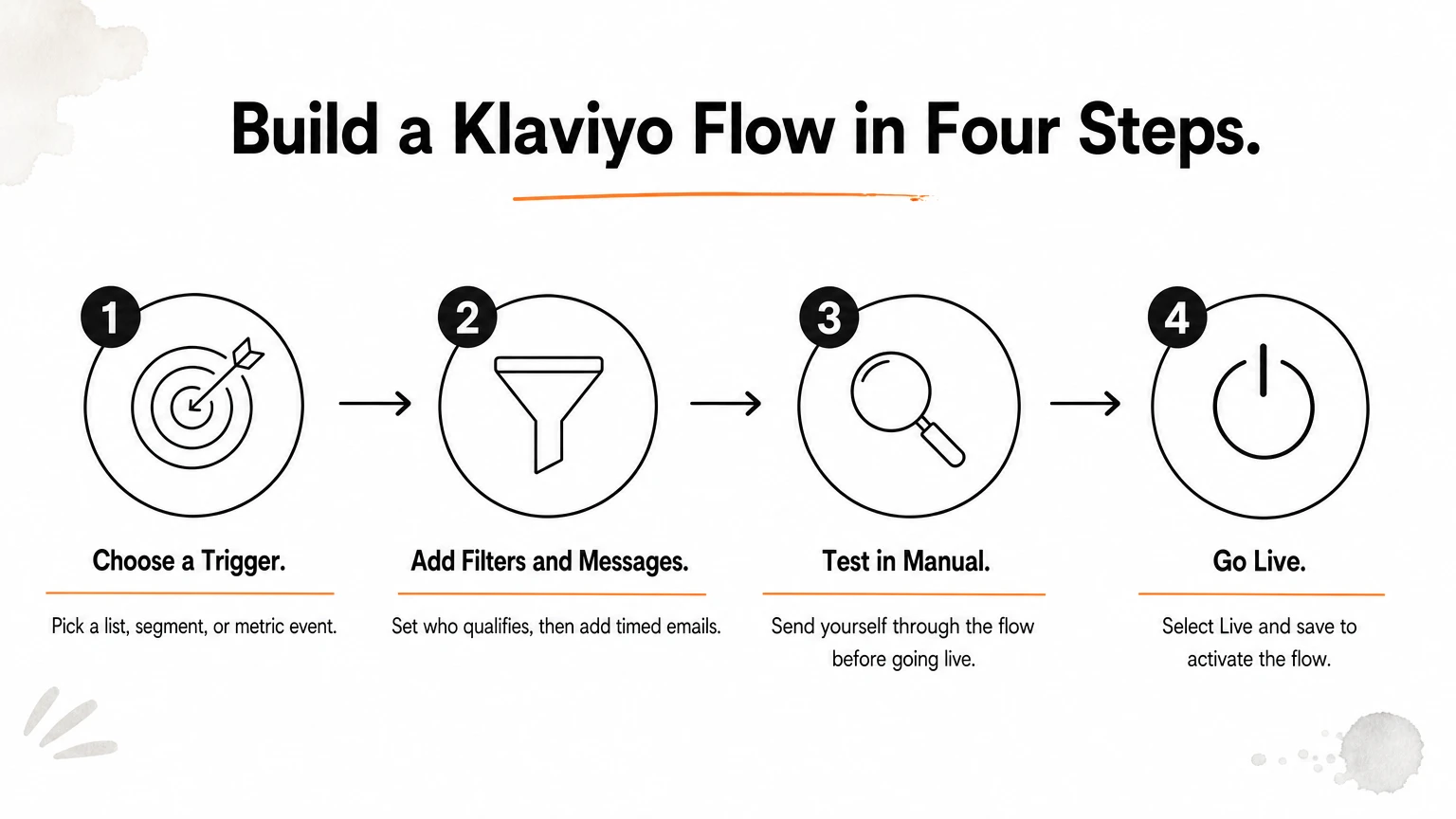
To create a flow in Klaviyo, open Flows, click Create flow, pick a template or start from scratch, choose a trigger, add filters, messages, and delays, then set the messages live. The whole process takes under an hour for a simple flow. The steps below follow the current flow builder.
Before you build
Finish the Setup Wizard and connect your store, so Klaviyo receives the events that power triggers. Check that your lists and segments exist before you need them in a trigger. If an existing flow is misbehaving, troubleshoot it first, since rebuilding rarely fixes a filter problem.
Create the flow and choose a trigger
Go to Flows, click Create flow, and the flow library opens. Filter templates by keyword, marketing goal, ecommerce integration, or channel. By default the library shows flows that use multiple channels, so narrow it if you want email only.
Give the flow a clear name, since account clutter builds fast. Then select a trigger and refine it. A list trigger needs the specific list, a segment trigger needs the segment, and a metric trigger needs the event.
Add filters, messages, and delays
Trigger filters and profile filters decide who qualifies. Klaviyo checks them when someone triggers the flow, again before each component, and again when a message is scheduled to send. Anyone who stops qualifying is skipped. Trigger filters are not rechecked at send time.
Drag actions from the sidebar onto the canvas, or use the + buttons. Add messages, data actions, and logic. A time delay must be followed directly by a live or manual action to work. Without a delay, back-to-back actions fire at once. On each message, turn on Smart Sending and UTM tracking so you do not flood customers and your revenue attribution holds.
Test, set live, and review
New messages start in draft, where nobody is scheduled. Manual queues recipients for your review without sending. Live sends automatically. Use manual while you test, and send yourself through the flow as a test subscriber before going live.
To activate everything, click Review and turn on or Update status, choose Live, keep Update status now selected, and save. Selecting the status alone does not turn the actions on.
After launch, click Show Analytics in the builder to see message metrics for an adjustable timeframe. Recipient activity shows who is waiting, skipped, or needs review.
A flow that is not live does nothing, so always check statuses before you walk away.
Advanced Klaviyo flows worth building next
Advanced Klaviyo flows go beyond a straight line of emails. They use conditional splits to personalize paths, extra triggers for less common moments, and exclusions to stop flows from colliding. Once the core ten are live and stable, these refinements are where compounding gains come from.
Conditional splits and personalization
A conditional split routes people down different paths. Splits can create up to 20 paths using profile data and, in metric-triggered flows, data from the triggering event. A cart flow can send high-value carts a different email than low-value ones.
Use splits where behavior genuinely differs: first-time versus repeat buyer, product category, or location. Splitting on every available property makes flows hard to maintain and hard to read. Add a split only when you can write a clearly different email for each branch.
More flow ideas beyond the core ten
Several triggers fall outside the core list of ecommerce automation flows but pay off for the right brand.
Birthday and anniversary: a date-property trigger sends a small perk on the date. A plain, warm email often outperforms a heavy discount.
Price drop: triggers when an item a shopper viewed or checked out drops by a set amount or percent.
Low inventory: warns shoppers when an item they viewed hits your threshold.
Zero-party data: a short survey in exchange for a perk gives you preference data for segmentation.
Instructional: how-to or care emails for products that need guidance.
Preventing flow overlap
Overlap happens more than people expect. A shopper can trigger browse abandonment and cart abandonment within an hour of each other. Use Smart Sending to cap sends in a set window, and add profile filters that exclude people already mid-sequence in a higher-priority flow.
Review your flows on a schedule. Products get discontinued, promotions expire, and a flow quoting last season's item chips away at trust every time it sends.
Start with three flows, then build out
Klaviyo flows are the part of email marketing that keeps working while you sleep. Start with welcome, abandoned cart, and post-purchase. Add browse abandonment, review, and back-in-stock next, then use cross-sell, winback, VIP, and sunset flows to get more from the customers you already have. Give each flow one job, test timing against your own data, and review the numbers on a schedule.
If you would rather have experts build and tune this system for you, have Chromex build your Klaviyo flows. We start with an audit, build the core automations, and then test every part of the program to grow email revenue.