Email automation marketing is the practice of sending emails automatically when a subscriber takes an action, or reaches a date, that you defined in advance. A shopper joins your list and gets a welcome email. Someone leaves a cart and gets a reminder an hour later. A customer goes quiet for 90 days and gets a win-back offer. You build each flow once, and your email platform runs it for every person without a manual send.
Most guides stop at that definition and jump to a list of tools. This article goes further. You will see why automation earns its place, how a triggered workflow works, how to set one up step by step, which flows to build first, and how to choose software. It also covers the mistakes that damage results and how to measure what you built.
We run ecommerce email marketing and SMS programs at Chromex, so many examples lean toward online stores. The principles hold for any business with a list and a website.
Why email automation marketing matters
Email automation marketing matters because it reaches people at the moment they show interest, and it does that every day without anyone pressing send. A broadcast campaign speaks to your whole list at once. An automated flow speaks to one person about one thing they just did. That difference in timing is where most of the revenue and relevance comes from.
Timing beats volume
Think about what a new subscriber knows about you in the first ten minutes. They just typed their email into a form. They are curious, and your brand is fresh in their mind. A welcome email sent right away meets that curiosity. The same email sent in next week's newsletter meets a stranger.
The same logic applies to every behavior. A shopper who viewed a product twice is closer to buying than one who never looked. A customer whose order arrived yesterday wants usage tips, not a hard sell. Automation lets you match the message to the moment, and nobody can do that by hand for hundreds of people a day.
What one automation can be worth
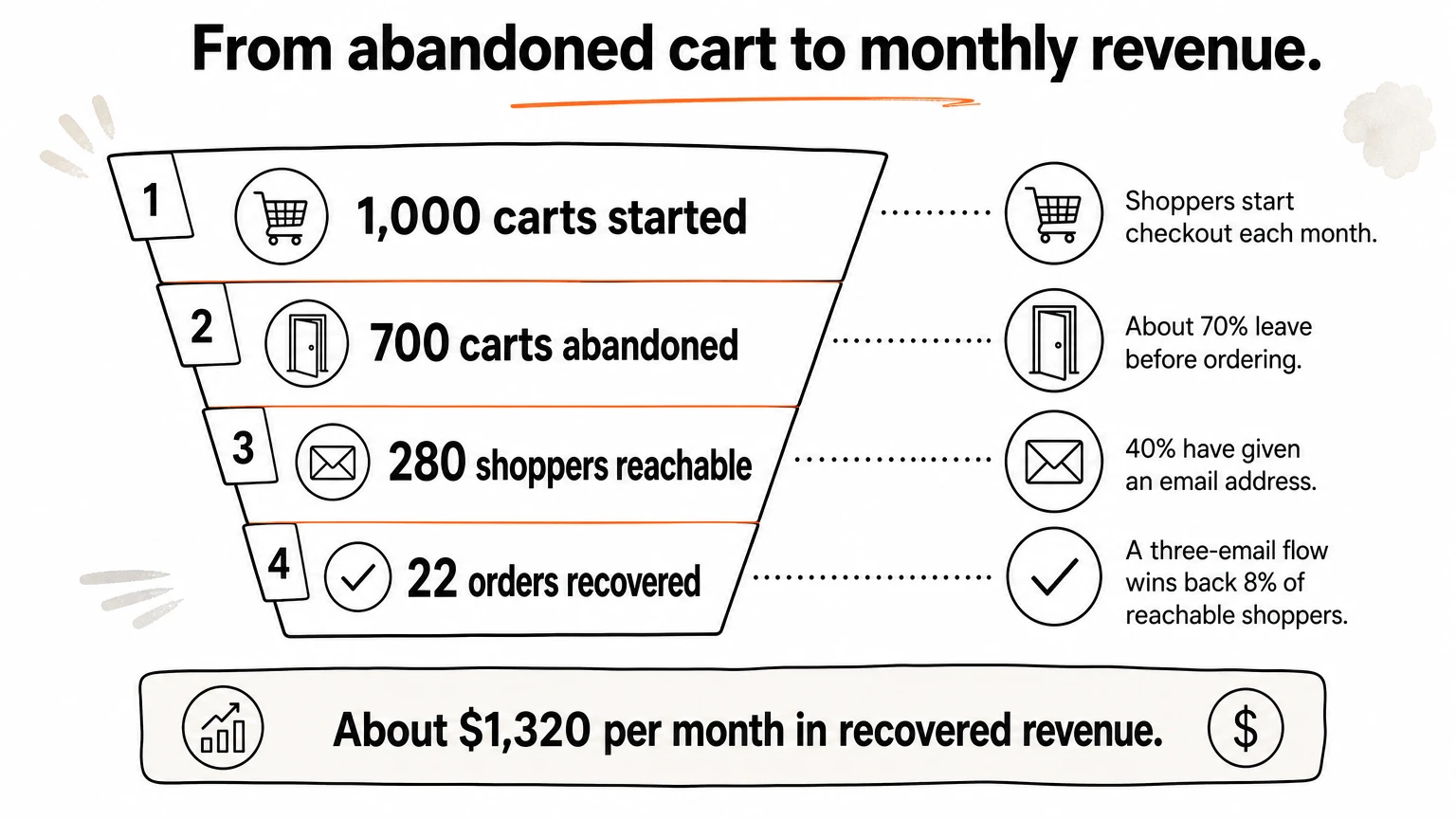
Abandoned carts show the math. Baymard Institute research puts the average cart abandonment rate for online stores at about 70%. The table walks through a hypothetical store. The inputs are assumptions, so swap in your own numbers.
Step | Assumption | Result |
|---|---|---|
Carts started in a month | Your store data | 1,000 |
Carts abandoned | About 70% | 700 |
Shoppers you can email | 40% have given an email address | 280 |
Orders recovered by a 3-email flow | 8% of reachable shoppers | About 22 |
Average order value | $60 | About $1,320 per month |
Those 22 orders cost you no extra ad spend, because the shopper already arrived on your site. The flow keeps running every month after you build it. At Chromex, email drives an average of 45% of our clients' monthly revenue. For one client brand, email drove nearly 70% of monthly revenue, and we generated more than $500,000 for it.
How automation fits with email campaigns
Email marketing and automation are two halves of one program. Campaigns are one-time sends, such as a sale announcement or a product launch. Automations are always-on flows that fire from behavior. A drip campaign is the simplest form of automation, a fixed sequence sent on a schedule. Behavioral automation goes further, because the path changes with what the recipient does.
Run both. Automations form the base that earns revenue from traffic you already paid for. Campaigns sit on top and give people reasons to come back. Without the base, every visitor who does not buy on the first visit is lost, and your team spends its time on manual sends and list pulls instead of strategy.
Automation does not replace campaigns. It makes sure no subscriber waits for your next send to hear from you.
How to set up email automation, step by step
Set up email automation by choosing one trigger, defining who should get the message and when they should leave the flow, writing the emails, and testing with a real contact before you switch it on. Everything else is refinement. Start with one flow, not ten.
How a triggered workflow works
Every email workflow, in any platform, has the same parts. A trigger starts it. Optional filters or conditions decide who qualifies. Delays space the messages. Actions send an email or SMS, add a tag, or update a profile. Exit conditions pull people out, for example when they buy.
The data reaches your email platform through a store integration, a tracking script on your site, or a webhook that reports events in real time. Once the trigger fires and the conditions pass, the platform sends the message. The table lists the trigger types you will use most.
Trigger type | Example | Typical email |
|---|---|---|
Form signup | Joins the list from a popup | Welcome series |
Site behavior | Views a product, adds to cart, starts checkout | Browse or cart reminder |
Purchase | Order placed or delivered | Thank you, how-to, review request |
Date | Birthday, anniversary, expected reorder date | Birthday offer, replenishment reminder |
Inactivity | No purchase or click for 60 to 90 days | Win-back |
Email engagement | Clicks a link about a topic | Follow-up on that topic |
Conditions make a flow smarter. A conditional split sends first-time buyers down one path and repeat buyers down another. An exit rule stops the cart reminders the moment the order comes through. Without exit rules, you will email people about things they already did.
Steps to build your first flow
Follow these steps in order. They work in Klaviyo, Omnisend, ActiveCampaign, and any other platform with a visual flow builder.
Pick one goal and one trigger. For example: recover abandoned checkouts, triggered when someone starts checkout without ordering.
Connect the data. Link your store or site, and confirm the event reaches the platform. Trigger a test event yourself and watch it appear.
Define the audience and the exits. Decide who qualifies, who is excluded, and what removes someone from the flow.
Map the sequence on paper. List each email, the delay before it, and its single job.
Write and design the emails. One message, one call to action per email, and a design that matches your brand.
Test with a real contact. Check merge tags, links, mobile rendering, branching, and where the email lands in the inbox.
Launch and watch the first week. Check sends, clicks, and revenue daily, then weekly.
A blueprint for an abandoned checkout flow
Copy this structure and adapt the wording to your brand.
Trigger: Started checkout, did not place an order
Filter: Valid email address, not in this flow in the last 7 days
Exit: Placed an order

Email 1 (wait 1 hour): "Did something get in the way?"
  Show the cart contents and a link to support.
Email 2 (wait 24 hours after email 1): Answer the usual objections.
  Shipping times, returns, and a customer review.
Email 3 (wait 48 hours after email 2): Last reminder.
  Add an incentive only for first-time buyers.
Keep the incentive out of the first two emails, and skip it for repeat customers. Otherwise you teach buyers to abandon carts and wait for a coupon.
Build one flow around one trigger and one goal, test it with a real contact, and only then start the next one.
Core email automations to build first
Build the flows that sit closest to revenue first: welcome, abandoned cart, browse abandonment, post-purchase, and win-back. Add the others as your list and data grow. This section covers the common set of email automation campaigns for online stores.
The core flows at a glance
The timings below are common starting points. Your own tests should replace them over time.
Flow | Trigger | Goal | Starting timing |
|---|---|---|---|
Welcome series | Joins the list | First purchase | First email immediately, then every 1 to 3 days |
Browse abandonment | Views products, leaves | Bring them back | A few hours after the visit |
Abandoned cart | Adds to cart, leaves | Recover the order | 1 hour, 24 hours, then 2 to 3 days |
Post-purchase | Order placed or delivered | Satisfaction, review, second order | Shipping update, tips, then a review request |
Replenishment | Expected reorder date | Repeat order | Before the product runs out |
Back in stock | Subscribes to an item alert | Sale of a wanted item | Right when stock returns |
Win-back | No activity for 60 to 90 days | Reactivate buyers | Two or three emails over two weeks |
VIP or birthday | Spend threshold or date | Loyalty | On the date or on qualification |
Flows for the first purchase
The welcome series gets the most attention of any email you send. Use it to deliver what you promised at signup, tell the brand story in a few lines, show best sellers, and set expectations for how often you will email. If you offer a first-order incentive, deliver it in the first email.
Browse and cart flows catch the intent signals. Browse abandonment is softer than a cart reminder, because the shopper has only looked. Show the products they viewed and nothing pushy. Cart and checkout flows can be more direct, since the person has already picked something.
Flows for the second purchase
Repeat buyers cost less than new ones, so post-purchase flows deserve real attention. Send the order confirmation and shipping updates as transactional emails. Then follow with usage tips, a review request after delivery, and a cross-sell tied to what they bought. Consumable products also suit replenishment reminders timed to when the product runs out.
Win-back flows target customers who have gone quiet for a set period, often 60 or 90 days. Reference their past purchases and make one clear offer. Then stop. If someone ignores the whole sequence, move them to a suppression list. Mailing unresponsive contacts forever hurts your deliverability, which the mistakes section covers.
If you can only build three flows, build the welcome series, the abandoned cart flow, and the post-purchase flow. They cover signup, intent, and the second order.
Segmentation and data that make automation relevant
Automation becomes effective when it uses what you know about each person, not only a trigger. Segments, tags, conditional splits, and tracking data turn a generic sequence into one that feels written for the recipient. Good data work is what separates a flow that earns a little from one that earns a lot.
Segments and tags
A segment groups people who share traits, such as customers who have spent over $200 or subscribers who never bought. A tag records a behavior or interest on the contact. A skincare store might tag someone as interested in acne care after two clicks on acne products. Later flows and campaigns can target that tag, so people hear about what they care about.

These data points are useful in almost every store:
First-time buyer or repeat buyer
Number of orders and total spend
Product categories viewed or bought
Whether they used a discount code
Date of last order and last email click
Conditional splits and dynamic content
A conditional split is an if-then-else branch inside a flow. In a welcome series, ask whether the person has placed an order yet. If yes, move them to a thank-you path. If no, keep sending the persuasion emails. This one split prevents the most awkward flow mistake, which is pitching a first-order incentive to someone who already ordered.
Dynamic content changes blocks inside an email based on data. A cart email can show the exact items left behind. A post-purchase email can recommend accessories for what they bought. This is personalization that goes well beyond a first name in the subject line.
Website and store tracking
A tracking script on your site lets the platform recognize an anonymous visitor. When that visitor later subscribes, their earlier browsing attaches to the new contact, so the first email can already reference what they viewed. A store integration passes orders, products, and revenue, which powers purchase-based flows and revenue reporting.
Basic site tracking is a matter of adding one snippet. Ecommerce tracking takes more care, so test that every event fires: product viewed, added to cart, checkout started, order placed. Collect consent where the law requires it, and say plainly in your privacy policy what you track. Lead scoring, which adds points for actions and alerts a salesperson at a threshold, matters more in B2B than in a typical online store.
A trigger tells the platform when to send. Your data tells it what to say and to whom.
How to choose email automation software
Choose an email marketing automation platform by matching it to your business model first, then testing its trigger depth, integrations, deliverability tools, and pricing model in a trial. The best email automation tools are the ones that fit your data source and your team's skills, not the ones with the longest feature list.
Criteria that matter
Use this checklist when you compare email marketing automation software:
Native integration with your store or CRM. Look for product-level events, not only subscriber data.
Trigger and condition depth. Can you branch on purchase history, product category, and engagement?
Visual flow builder. You should be able to see the whole journey and edit a live flow safely.
SMS support. If you plan to use text messages, check that email and SMS can sit in one flow.
Deliverability tools. Look for domain authentication guidance, bounce handling, and engagement-based sending controls.
Revenue reporting. You want to see money per flow, not only opens and clicks.
Pricing model. Some tools bill by contacts, others by emails sent.
Platforms by use case
Platforms differ in what they do best. This table groups the ones that come up most often, based on how each is commonly described and used.
Your situation | Platforms often chosen | What to know |
|---|---|---|
Online store that wants revenue from flows | Klaviyo, Omnisend, Drip | Deep store integrations and product-level triggers. Omnisend runs email, SMS, and push in one workflow. |
Complex multi-step logic plus a CRM | ActiveCampaign, HubSpot | Very deep branching and built-in CRM. ActiveCampaign has a steeper learning curve, and HubSpot costs climb quickly on higher tiers. |
Small budget, first automations | MailerLite, Brevo | Simple builders. Brevo bills by emails sent rather than by contacts. |
Newsletter plus basic flows | Mailchimp | Familiar editor and many integrations. Check how it counts unsubscribed and bounced contacts in your bill. |
Webinars and funnels | GetResponse | Webinar hosting and funnel templates in one tool. |
We work on the major platforms and are an official partner of Omnisend's platform. Our view is simple: pick the platform your team can run well and that your store data connects to cleanly.
Pricing traps and how to test
Compare more than the starting price. Some entry plans cap the number of automations or the steps inside a flow, so confirm on the pricing page that the flow you need is included. Check whether the price rises with contacts or with sends, and what your bill looks like at double your current list. Several platforms offer small free tiers, but limits change, so verify them before you rely on one.
Then run a real trial. Build your welcome flow with one conditional split, connect your store, and send a test contact through it. Check where the emails land and whether the report shows revenue per flow. An hour of testing tells you more than any feature table.
Before you pay, build one real flow in the trial. If it feels slow or the data will not connect, move on.
Mistakes that hurt email automation results
The most damaging mistakes are sending to people who should not receive your emails, letting flows overlap, and never revisiting a flow after launch. Most of them are easy to avoid once you know where to look.
Deliverability and compliance
An automation that lands in spam earns nothing. Authenticate your sending domain with SPF, DKIM, and DMARC. Gmail's email sender guidelines ask bulk senders to authenticate this way, offer easy unsubscribing, and keep spam complaint rates below 0.30%. Even if you send fewer emails, those practices protect your reputation.
In the United States, the CAN-SPAM Act requires a clear way to opt out, a valid physical postal address, and honest sender and subject information. Keep subject lines straightforward, avoid all caps and bait phrases, and remove contacts who bounce or never engage.
Flow design errors
Most underperforming programs share the same handful of design faults:
Overlapping flows. A new subscriber who also abandons a cart can land in two flows at once and get several emails in a day. Set flow priority and send limits.
No exit rules. Cart reminders that keep arriving after the purchase annoy customers and generate complaints.
Constant discounts. If every flow carries a coupon, customers learn to wait for one.
Set and forget. Prices, products, and shipping policies change. A flow that mentions an expired offer damages trust.
Broken triggers. A theme change or a new checkout app can silently stop events from firing. Check flow sends weekly.
Generic templates. An email that looks like everyone else's does not stand out in the inbox.
An automation that nobody reviews slowly drifts out of date, and customers notice before you do.
How to measure and improve your automations
Judge each automation by revenue per recipient and its share of total revenue, not by open rates alone. Open rates are a weak signal, because some mail apps load images automatically and inflate opens. Clicks, conversions, and revenue tell you whether the flow works.
Metrics worth tracking
Metric | What it tells you | How to use it |
|---|---|---|
Revenue per recipient | How much each person who entered the flow is worth | Compare flows and test variants |
Flow share of email revenue | How much your base earns versus campaigns | Check it monthly |
Click and conversion rate | Whether the message and offer persuade | Fix weak emails first |
Unsubscribe and complaint rate | Whether you are annoying people | Cut frequency if either rises |
Placement and bounce rate | Whether emails reach the inbox | Clean the list, review authentication |
Testing one change at a time
Test one variable per experiment, so you know what caused the result. Good candidates are the subject line, the delay between emails, the number of emails, incentive versus no incentive, and the send time. Let each test run until you have enough sends to trust the difference.
Here is a worked example. Version A of a cart flow reaches 2,000 recipients and earns $3,000, which is $1.50 per recipient. Version B, with a shorter first delay, reaches 2,000 recipients and earns $3,400, which is $1.70 per recipient. That is about 13% more from one change. A program that keeps testing every part of the system compounds gains like this over months.
Revenue per recipient is the number that settles arguments. Opens and clicks only explain it.
When an email automation service makes sense
Hire an email automation service when your traffic and list justify a full program but you lack the time or expertise to build, test, and maintain it. If you can run your own flows well, you do not need one. The choice is about bandwidth and skill, not size alone.
Signs it is time to get help
These signals suggest outside expertise will pay for itself:
Email brings in a small share of revenue, say under 10%, while paid traffic costs keep rising.
Your flows are missing, outdated, or built from generic templates.
Opens and conversions are low, or deliverability is shaky.
You have been let down by freelancers who disappeared or delivered inconsistent work.
Reporting is unclear, so you cannot tell what email actually earns.
What a structured service looks like
Look for a clear process rather than vague promises. Here is how ours works at Chromex.
Stage | Timing | What happens |
|---|---|---|
Analyze | Day 1 to 5 | Full email audit, deliverability fixes, market and competitor insights, and a 60-day action plan |
Create | Day 5 to 15 | Build of all 8 core automated email sequences and a high-converting sign-up form |
Kickoff | Day 15 | Campaign calendar and value-based campaigns that support the automations |
Optimize | Day 30 onward | Mass testing of every part of the email system to compound revenue |
When you compare any email marketing automation services, ask who actually does the work, how results are reported, which platforms they support, and how pricing is structured. Our pricing is performance-based rather than fixed packages, and we report in plain language. Whoever you choose, insist on custom email design and clear reporting tied to revenue.
A good service is measured by revenue it adds, not by the number of emails it sends.
Start with one flow
Email automation marketing sends the right message when a person shows intent, using triggers, conditions, and your customer data. It works because timing and relevance beat volume. Build one flow at a time, starting with the welcome series, abandoned cart, and post-purchase flows, then add segmentation, testing, and measurement by revenue per recipient.
Choose a platform that connects cleanly to your store and fits your team's skills, and protect deliverability from the start. Check each flow regularly so it never drifts out of date.
If you would rather have specialists build and run the program, see how Chromex builds email automation for ecommerce brands.